The journey of a request : from your computer to the server and back.
Every time you open a website or click a button, a request travels a long path before you see the result. In this post we follow that journey step by step, in simple words, so you understand what really happens between hitting Enter and seeing the page.

Hossam Mohamed
April 25, 2026
About What is a request?
A request is just a message your browser (or app) sends to a server asking for something like a page, an image, or some data. The server reads the message, does its work, and sends back a response. The interesting part is everything that happens in between, and it is more than most people think.
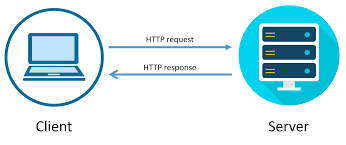
1- Before the request even leaves your computer
A lot of work happens inside your own machine before a single byte goes out to the internet.
What your browser does first:
- • URL parsing : the browser splits the URL into protocol (https), host (example.com), port, path, and query string so it knows what to ask for and from whom.
- • Browser cache check : if you visited the same page recently, the browser may already have a copy and skip the network completely.
- • Service workers and HSTS rules : modern browsers may upgrade http to https automatically, or hand the request to a service worker that answers offline.
- • DNS lookup : your computer asks “what is the IP address of example.com?” It checks its own cache first, then your router, your ISP, and finally the global DNS system if needed.
How fetch / update flows look

2- Reaching the server over the network
Now that your computer knows the IP address, it has to actually open a safe path to the server and send the message.
Step by step on the wire:
- • TCP connection : your computer and the server greet each other with the famous three-way handshake (SYN, SYN-ACK, ACK) so they can send data reliably.
- • TLS handshake : for HTTPS, both sides exchange certificates and keys to make sure the server is really who it claims to be, and to encrypt everything that follows.
- • The request itself : your browser sends a small text message with the method (GET, POST…), path, headers (cookies, auth, user agent) and a body if needed.
- • Through the internet : the message travels through your router, your ISP, and many other routers across the world before arriving at the server, hopping from one network to the next.
3- What the server does with your request
On the other side, the request usually does not go straight to your code. It passes through a few layers first.
Inside the server:
- • Load balancer : many apps run on multiple machines. A load balancer picks one healthy server and forwards your request to it.
- • Reverse proxy (like Nginx) : handles HTTPS, gzip, and rate limits, then passes the clean request to your application.
- • Your app code : the framework matches the URL to a route, checks auth, validates the body, and runs the controller or handler you wrote.
- • Database or other services : the handler often reads or writes data, calls another API, or fetches something from the cache before it can answer.
- • Building the response : the server creates a status code (200, 404, 500…), headers, and a body (HTML, JSON, image…) and sends it back through the same path.
4- The response comes back to your browser
Getting the bytes back is only half the story. Your browser still has to turn them into something you can see and use.
What happens after the bytes arrive:
- • Decompression and decryption : the browser unwraps the gzip or brotli compressed body and decrypts it using the TLS keys.
- • For an HTML page : it parses the HTML, builds the DOM, and starts asking for the CSS, JS, images, and fonts the page needs (each one is a new little request).
- • For an API call : the response is usually JSON, and your React or other client code reads it, updates the state, and re-renders the part of the screen that depends on it.
- • Caching : the browser may store the response based on Cache- Control headers so the next visit is faster.
- • The page is shown : and from your point of view, the click just “worked”, even though dozens of small steps ran behind the scenes.
Newsletter
Leave message for me to get updates about my latest projects. or if you have any suggestion i will be happy to hear .